Showing posts with label Websites. Show all posts

Thursday, 12 July 2018

Check it Out


I can not take credit for the finding the following websites and apps. A staff member I had the pleasure to work with this year attended the ETFO workshop for Technology and shared her learning so now I'm sharing it with you. 

Websites to check out:
https://www.getepic.com/ - Netflix but for books!  (There is a cost)
https://mathbeforebed.com/ - Great for number talks
http://www.estimation180.com/​ - Number Talks!
https://www.nytimes.com/video/360-video - 360 videos, really good for social studies etc.  There are videos of refugee camps as well which could support discussions
https://padlet.com/ - Collaborative board maker.  Haven used it, but it has come up a lot (free)
https://wonderopolis.org/ - tons of articles, great for inquiry.  Has a reading tool for students that cannot read independently
http://www.gamingedus.org/ - whole site dedicated to game based learning (Minecraft, Breakout etc)
https://quizizz.com/ - make and play online quizzes.  Like Kahoot, but you can assign as homework, and there is a meme maker

Apps:
Blippar- use the app to focus on an object, and it will pop up information about it.  I used it in the woods with my class to identify plants.  Some worked, some didnt.  Still interesting.

Hyperdocs- Student driven learning in Google Docs.  Tasks given in the doc, students follow the directions, and create various products.  Check out this website https://hyperdocs.co/ for more information.  There is even a ¨Teachers Give Teachers¨ page where you can search up subject specific hyperdocs.

Finally, here is the link to a Google doc that gives you every app/site that could be used to Hook, Explore, Explain, Apply, Share, Reflect, and Extend learning:
https://docs.google.com/document/d/1V_eZE7rDrv8g0v3q3ST1XelyF7znXzHGfnRjy1Pha4A/edit?usp=sharing​ 

I hope you can find some use for any of these.  Enjoy and happy summer!

Saturday, 7 March 2015

Online Free Reading Books and Activities

Check out this link for some great online free reading books/follow up activities for children for K-6 (or older depending on their reading ability).

[ http://www.oxfordowl.co.uk/Reading ]http://www.oxfordowl.co.uk/Reading

Sunday, 22 June 2014

Video Sites

7 engaging video sites for teachers and students

7 engaging video sites for teachers and students
1. Big Think, similar to TED, features more than 12,000 videos from experts in a multitude of disciplines. Expert perspective can inspire thoughtful student debate in class.
2. @GoogleTalks can give students the motivation they need to expand classroom discussions and delve deeper into concepts and ideas. In addition to videos from innovators discussing their latest ideas, clips also include those from authors, musicians, and others.
3. NeoK12 offers science videos, lesson, and games on topics such as the human body, geography, physical science, and life science. Other topics include history, social studies, and more.
4. WatchKnowLearn.org puts educators and students in touch with free educational videos organized by subject. Those subjects include foreign languages, arts, math, science, computers and technology, and more. Users also can upload videos and share their favorite resources.
5. MIT Video features a variety of MIT-produced content, but this includes academic content and videos on interesting and unique concepts. A new video is spotlighted each day.
6. KidsKnowIt Network is an engaging and free resource that children can use to learn about astronomy, math, spelling, geology, and more.
7. The Science Network brings together renowned scientists and science experts as they discuss science, social policy, and all manner of scientific concepts, including how neurons are formed, morality and the brain, and more.

Thursday, 12 June 2014

Code

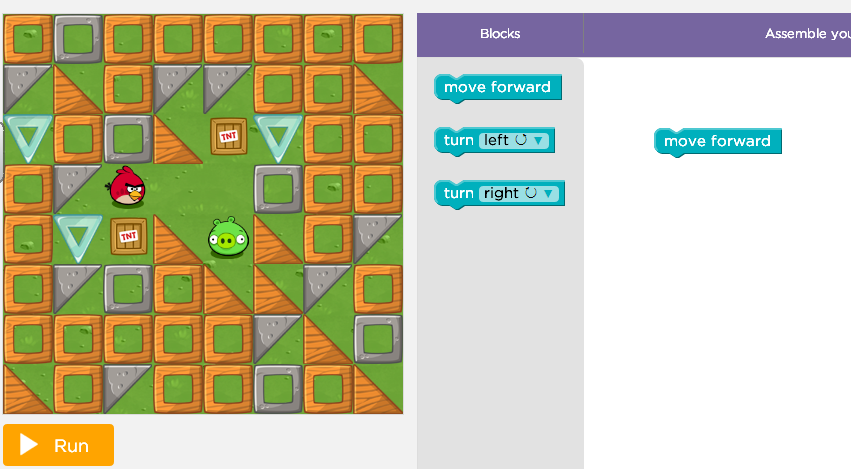
You can teach your students computer science with code.org

I have used Scratch with grade 3 and 4 students. This program is set up to show a video which is a greats minds on and then students can work through the tutorial using angry bird characters. It starts off very simple with stacking blocks move forward. 


http://code.org/learn


Saturday, 7 June 2014

Piktochart - Infographics

Infographics

http://piktochart.com/

CREATE EASY INFOGRAPHICS


Explain data in an eye catching and appealing way!

Sharing data in a fun and interesting way!!

Use for data management strand in math curriculum students can use program to create infographics

Use for literacy (multimedia strand) create a poster that shows data

Use for staff meetings to display school data an interesting way.

Key Points:

There is a presentation mode

Free access

Piktochart Editor

Kathy Schrock

Infographics as a Creative Assessment

@kathyschrock


Sunday, 25 May 2014

Todays Meet

Todays Meet - Talk ~ Listen

Embrace the backchannel and connect with your audience in real time

Online discussion similar to twitter but you set up a room and invite others to participate in the conversation. Your message can only be 140 characters


Near Pod


Engage your audience by having them follow along with your presentation -The presenter controls the screen 

You need to set up an account which you can do for free! If you have a google account you can use your google account to login to Near Pod.

Once you login in you can create a presentation, join a presentation, check out your library.

You can create a presentation from scratch or upload (PDF or PPT) a presentation you have already created.

You can add an activity to your presentation:

1. Poll - the presenter controls when the respondents answer the question
2. Quiz - the respondents can answer the question at their own pace
3. Draw
4. Open Ended Question

You can add content from the web, pictures, you tube videos, twitter stream

The Reports show you the responses to the quiz, poll etc.

You can send a homework assignment by email

Students or audience need to have an electronic device to join the presentation - however they do not have to have an account 


Saturday, 24 May 2014

Above and Beyond showcases 4 C's


Above and Beyond


This you tube video showcases the 4C's essential for 21st century learning

Created through collaboration by members of Partnership for 21st Century Skills and the talented folks at FableVision, Above & Beyond is a story about what is possible when communication, collaboration, critical thinking and creativity take center stage in schools and transform learning opportunities for all kids.Visit www.p21.org, www.p21.org/4Cs and www.fablevisionstudios.com for more info.

Above and Beyond has been adapted into a children's book, entitled Going Places. Written by Paul Reynolds and illustrated by Peter H. Reynolds, the book was published by Antheneum Books for Young Readers in 2014. To get more info on the book:http://shop.fablevisionlearning.com/g... 

Thursday, 15 May 2014

National Film Board


Here is another website that is free for teachers. Access to videos great for social studies


 https://www.nfb.ca/

VROC

I was reminded tonight about a website that is an excellent tool for inquiry learning: VROC.

VROC stands for Virtural Researcher on Call and as the name suggests teachers and students can access experts on demand. 

Experts on Demand: Students can talk to experts in real time through video conferencing. For this you need to sign-up but it is free!

Videos: There are also inspiring videos for students to watch. 

Saturday, 26 April 2014

Remind 101

Remind 101 - send text message to parents without giving out your cell phone number


  • teachers can engage parents and students in learning with reminders
  • you can download the app for free
  • the user (teacher/principal etc) is the only person that needs to sign up
  • messaging is free as long as the receiver has text messaging
  • it can replace a phone tree
  • you can create classes
  • send invitation to parents who will respond to the invite (print PDF all instructions are there)
  • you never get the parents phone number and the parents never get your number
  • you can not reply so it limits inappropriate content between users
  • great for older students who use text!
  • uses: co-op for highschool, coaches, teachers, administration
  • maximum is 200 people in one class


Sunday, 6 April 2014

Flipped Education

Website Created by Molly Schroeder Flipped Education

On the page linked Molly shares tips and tricks for Google + and Google Hangout